

Budgee product updates
Small, practical release notes for short-term cash flow forecasting, reporting, scenarios, Xero imports, and setup workflows.
Sort rows and transactions
Sort rows and transactions by the context you need right now: largest amounts, alphabetical order, payment state, date, or import source.
The board can surface the largest rows, overdue items, or imported transactions without changing the underlying transactions or accounting data.
Sort rows and transactions
Budgee now has board sort controls for grouped rows and transaction cards.
Sort rows and transactions
Sort rows and transactions by the context you need right now: largest amounts, alphabetical order, payment state, date, or import source.
The board can surface the largest rows, overdue items, or imported transactions without changing the underlying transactions or accounting data.
- Sort grouped rows by manual order, A-Z, or amount.
- Sort transactions by date, amount, A-Z, payment state, or import source.
- Use Clear sort to return a tab to its default order.
- Sorting changes the current view only, so the underlying data stays untouched.
Cloud-powered Xero imports
Budgee now runs Xero imports in the cloud so larger imports can keep running after you leave the page.
Cloud-powered Xero imports
Budgee now runs Xero imports in the cloud, so larger imports can run faster and continue without relying on the browser window staying open.
Firms can start imports across multiple organisations, leave the page, return to current progress, and resolve interrupted imports from the import screen.
- Imports keep running if you close the window or leave the page.
- You can start imports for multiple organisations at the same time.
- Larger imports can complete faster.
- Interrupted imports can be resumed, cancelled, or cleared without leaving the import in an uncertain state.
Version 1.3404
Version 1.3404 includes print-ready reports, saved snapshots, transaction multi-select, reporting controls, scenario planning, import progress, and import scope controls for short-term and 13-week cash flow forecasting.
Print-ready financial reports
Budgee turns a live cash flow forecast into professional financial reports for meetings, PDF export, and monthly reporting.
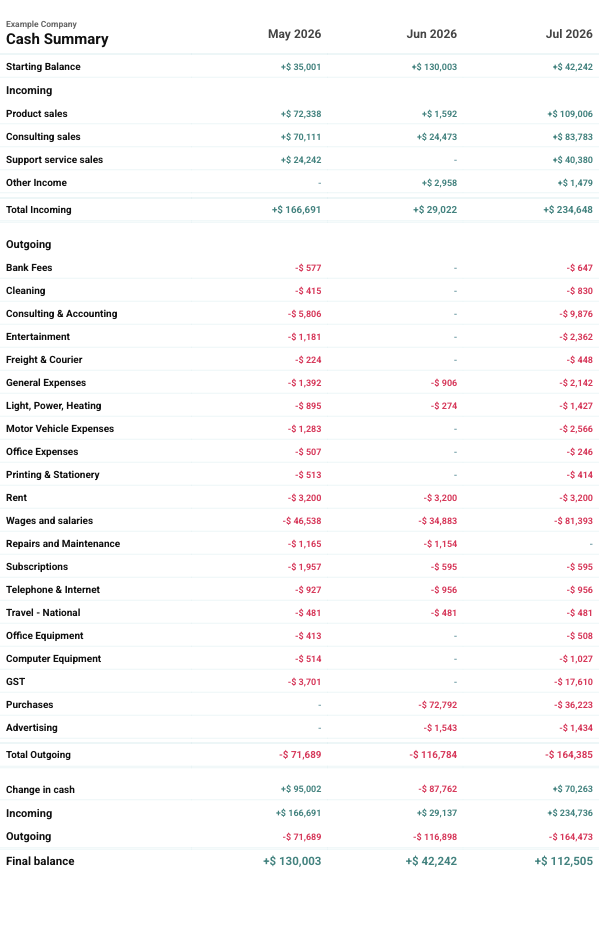
Cash flow reports are ready for meetings, reviews, lenders, advisors, and internal planning without rebuilding report packs in spreadsheets.
- Print Cash Summary, Profit and Loss, Statement of Cash Flow, Balance Sheet, and cash flow dashboard reports.
- Printed reports include company names, report titles, period columns, section headings, totals, balances, and report-ready formatting.
- Choose the start date and number of periods to print so each report matches the review period.
- Dashboard printing waits for key dashboard report sections to finish loading before opening the print dialog.
Saved snapshots
Point-in-time snapshots are available for Cash Summary-style cash flow views.
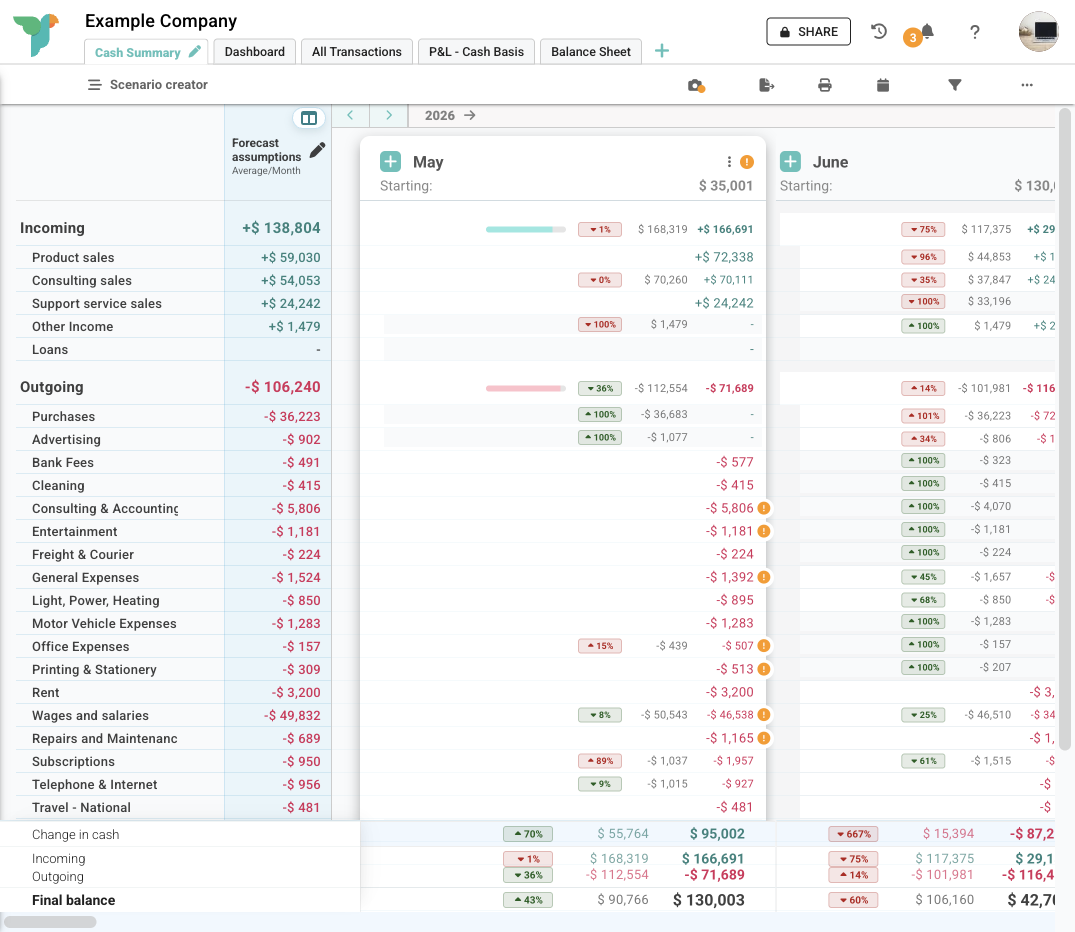
Snapshots preserve planning checkpoints, past cash flow assumptions, and key cash flow positions without relying on memory or manual screenshots.
- Save point-in-time snapshots of Cash Summary-style cash flow views.
- Capture the view setup, filters, and scenario state active when the snapshot is created.
- Keep a record of what was being reviewed during planning conversations, reporting checkpoints, or internal reviews.
- Return to a saved view later when past assumptions or cash flow positions need to be checked.
Transaction multi-select and bulk forecast actions
Select multiple forecast transactions and apply bulk actions from the cash flow forecast batch bar.
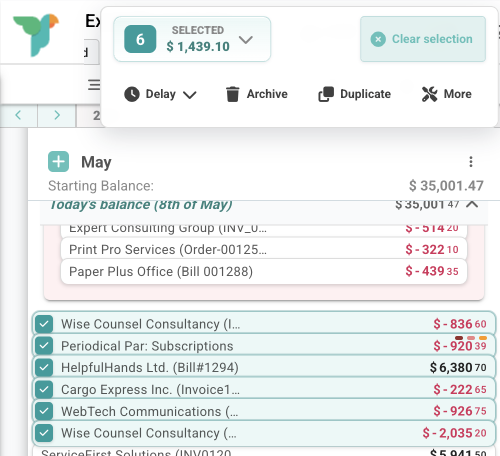
Month-end cleanup, forecast updates, and planning adjustments take fewer individual edits on organisations with high transaction volume.
- Select individual transactions, a range of transactions, or matching visible transactions by contact, invoice or reference, category, or bank account.
- See a batch action bar with the selected count and total selected value.
- Delay selected forecasts or move them to today or a future date.
- Archive, duplicate, or drag selected transactions together as a group.
- Open Batch Tools with the selected transactions already targeted.
Bank account visibility controls
Bank account settings control visibility across totals, transaction views, selectors, and reports.
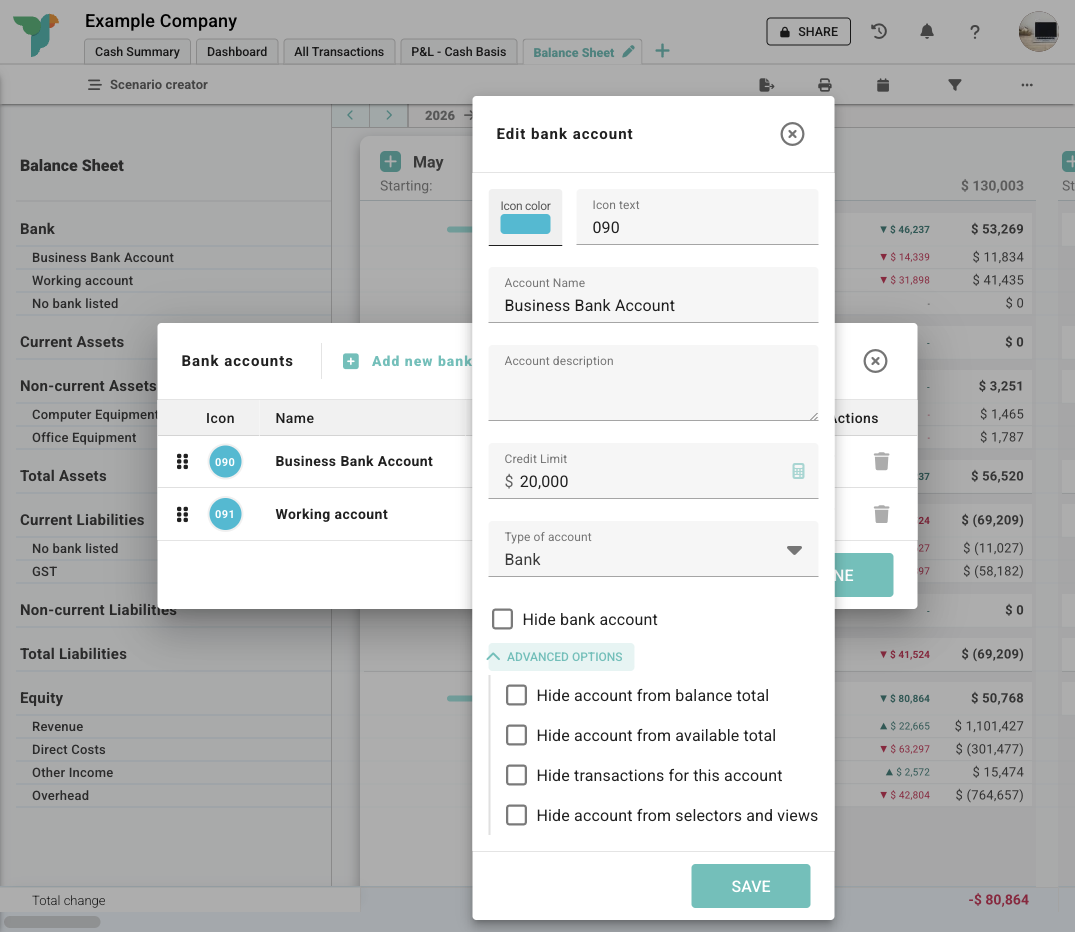
Clearing accounts, loans, offsets, investments, and other special accounts appear according to their account visibility settings.
- Control whether a bank account appears in balance totals, available funds totals, transactions, selectors, and views.
- Use visibility icons to see whether an account is visible, partially hidden, or fully hidden.
- Classify accounts as PayPal, loan, clearing, term deposit, offset, suspense, or investment accounts.
Financial reporting depth
Cash Summary, Profit and Loss, Statement of Cash Flow, Balance Sheet, and dashboard reports use aligned grouping, totals, and summary sections.
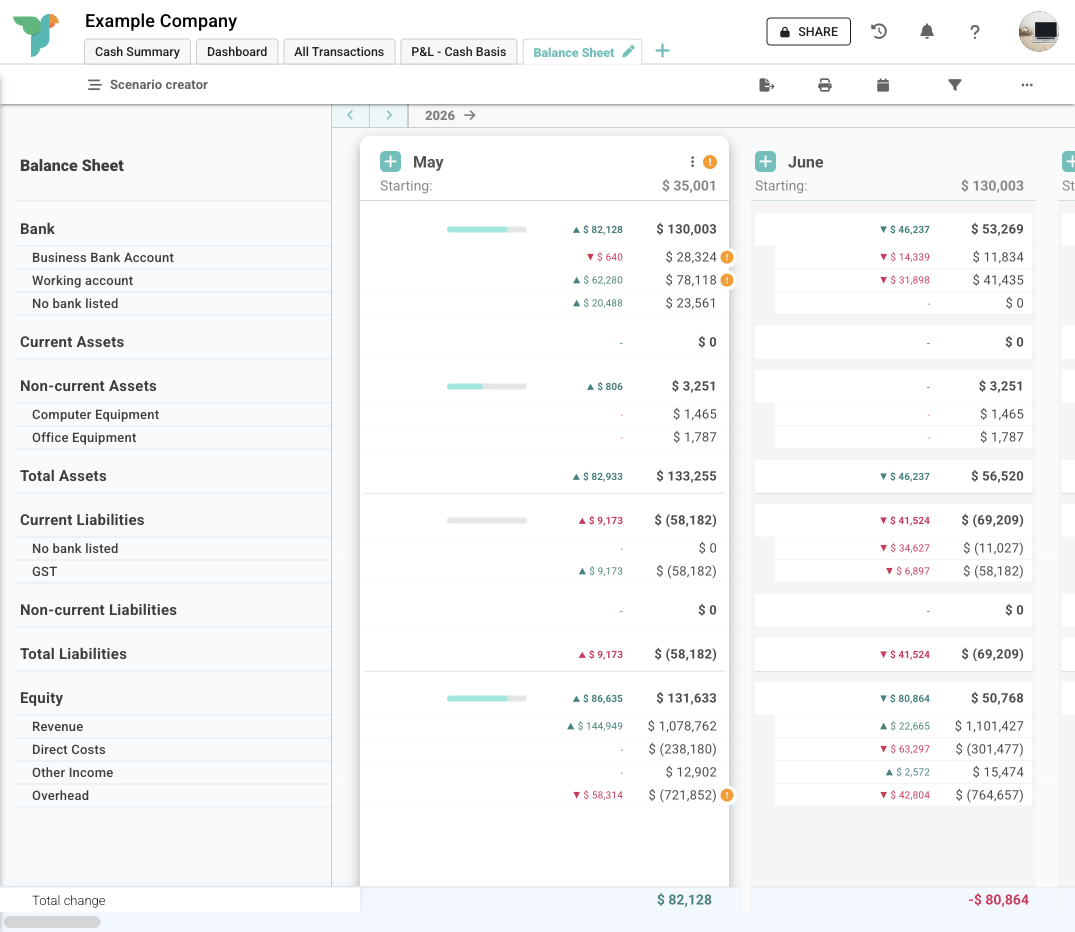
Cash Summary, Profit and Loss, Statement of Cash Flow, Balance Sheet, and dashboard reports follow matching reporting logic.
- Balance Sheet style reporting is available for business organisations with bank, asset, liability, and equity data.
- Cash Summary, Profit and Loss, Statement of Cash Flow, Balance Sheet, and cash flow dashboard reporting use aligned groupings and totals.
- Cash flow dashboard reporting includes a wider reporting window and Balance Sheet summary widgets where enabled.
Scenario folder controls
Cash flow scenario planning folders group larger planning models as assumptions are duplicated, grouped, and rolled forward.
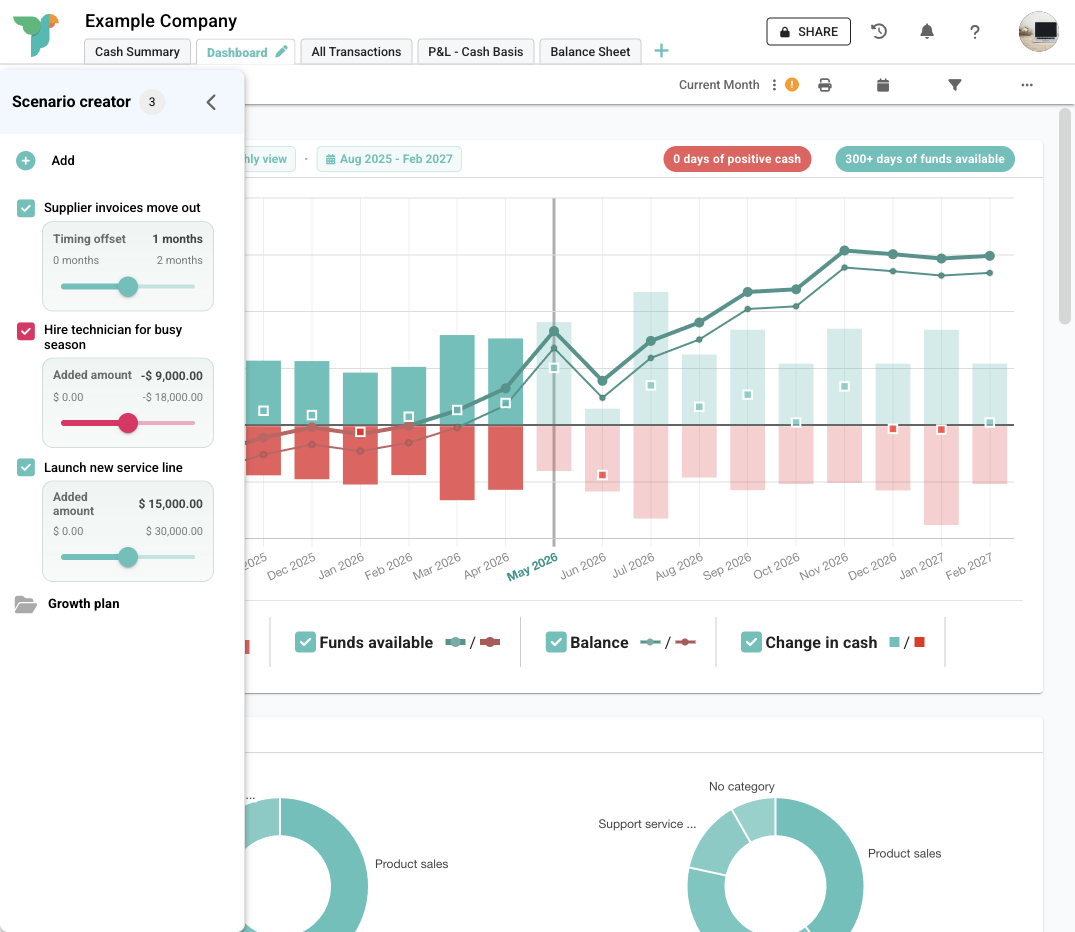
Scenario folders group timing, hiring, tax, funding, and growth options into planning sets.
- Work with nested scenario folders.
- Duplicate grouped scenarios.
- Delete grouped scenarios.
- Shift scenario or folder dates forward while preserving recurring forecast timing.
- Use scenario sliders and grouped activation in scenario setups that include those controls.
Setup search and archived items
Search large charts of accounts, category lists, bank account lists, contact lists, and scenario targets.
- Search category, bank account, contact, and target selectors across filters, setup, scenarios, and transaction workflows.
- Archived categories stay available on historic transactions and forecasts without appearing as standard choices for new work.
- Hidden bank accounts stay out of everyday selectors and views while existing references remain intact.
View setup controls
Organisation views include configuration for working forecasts, management review, and cash flow reporting.
- Control whether cents are hidden.
- Control whether balances are shown.
- Choose how empty rows are handled at group, subgroup, and third-level rows.
- Set grouping, subgrouping, third-level rows, and empty-row behaviour for cash flow reports and organisation views.
Forecast rollups and repeat options
Forecast assumptions consolidate into category-level rollups or repeat across weekly and monthly cash flow projection patterns.
- Roll customer-level forecasts into category-level forecast assumptions.
- Use repeat-last forecasting with repeat patterns including monthly-style repeats.
- Use repeat-last-12-months forecasting as individual transactions, weekly totals, or monthly totals.
- Review forecast method menus with unavailable methods disabled and date ranges shown.
Xero import progress and scope controls
Xero imports include progress reporting and import scope controls for categories, bank accounts, and contacts.
- Follow long-running imports with progress messaging that shows the import is still running.
- Open optional import detail views while import work is running.
- Set Xero import scope for categories, bank accounts, and contacts.
- Xero-connected organisations include import matching, forecast adjustment records, journals, overpayments, and balance diagnostics.
See how the new workflows fit into Budgee.
Read the help centre for task-by-task guidance, or book a demo to see how the reporting and forecasting workflows fit into cash flow planning.