
Cash flow forecast template for small businesses
Download a simple spreadsheet with a starting cash balance, common incoming categories, detailed outgoing rows, protected formula rows, closing cash, and a scenario tab with an on/off adjustment line.
What is inside the template
This workbook is built for small businesses and advisers who need a simple way to see cash timing before moving into dedicated forecasting software.
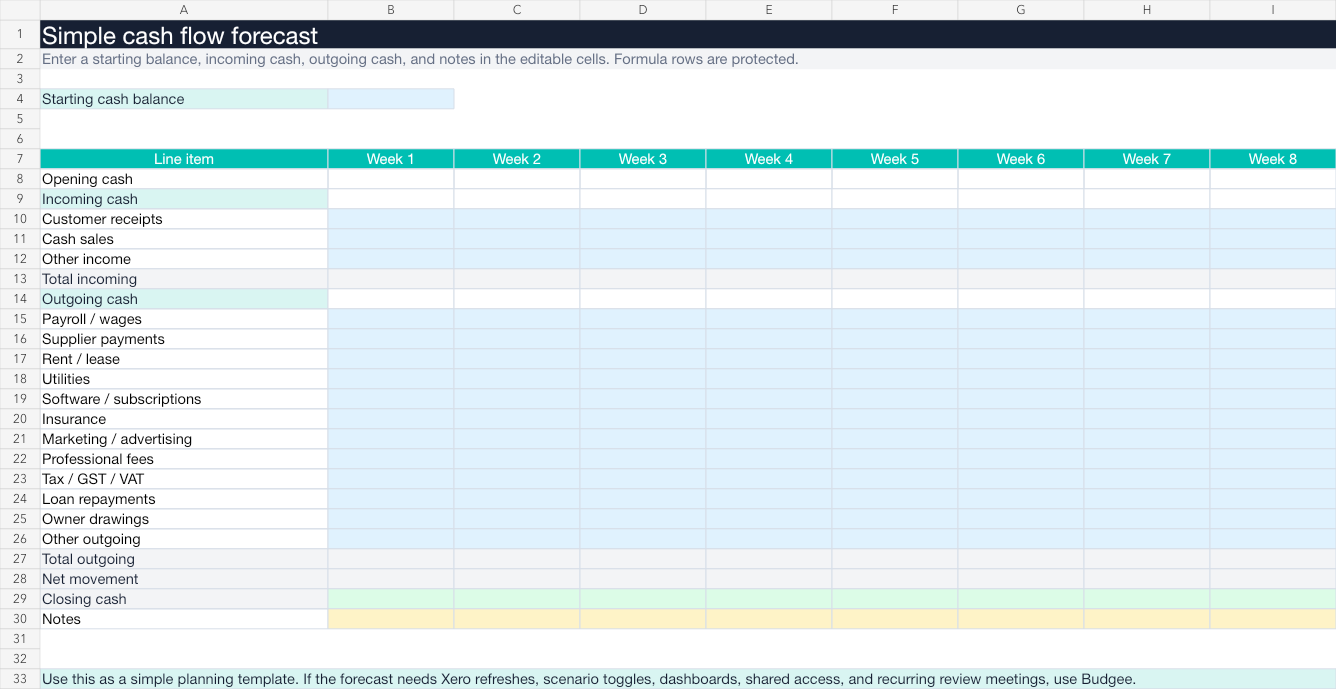
The Forecast tab includes customer receipts, cash sales, other income, payroll / wages, supplier payments, rent / lease, utilities, software / subscriptions, insurance, marketing / advertising, professional fees, tax / GST / VAT, loan repayments, owner drawings, and other outgoing. The input cells are empty and editable; the formula rows are protected.
Forecast
Starting cash balance, common incoming categories, detailed outgoing categories, protected formulas, net movement, closing cash, and notes.
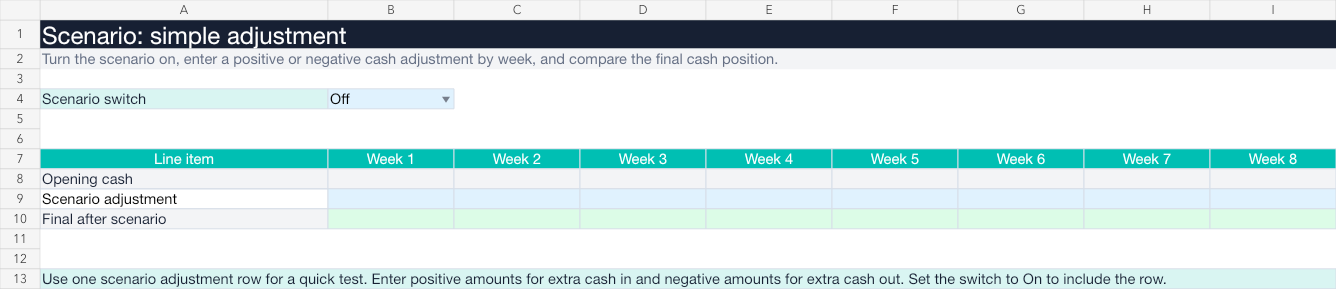
Scenario
Turn one scenario adjustment line on or off and see the effect on final cash.
Template preview
The workbook has one simple forecast tab and one scenario tab. That is enough for a starter template: beginning cash, common business categories, closing cash, and one quick scenario adjustment.
When this spreadsheet is enough
A cash flow forecast template is enough when the business has simple cash movements, one person owns the forecast, and you only need a one-off plan.
- The business has simple cash timing.
- You do not need live Xero updates.
- You are not running multiple scenarios.
- The forecast will not be used in recurring client meetings.
When the template starts to break
The template becomes harder to trust when cash timing changes every week, Xero exports need to be refreshed manually, or you need to test more than one scenario.
- Customer payments arrive later than invoice due dates.
- Payroll, tax, and supplier payments cluster together.
- Someone copies the file and creates a second version.
- Formula ranges get changed by accident.
How to use the template
- Enter the starting cash balance on the Forecast tab.
- Enter expected incoming cash by category, such as customer receipts, cash sales, and other income.
- Enter expected outgoing cash by category, such as payroll, suppliers, rent or lease, utilities, software, insurance, marketing, professional fees, tax, loans, drawings, and other outgoing.
- Review the calculated net movement and closing cash.
- Add plain-English notes where timing is uncertain.
- Use the Scenario tab to enter one positive or negative adjustment row.
- Turn the scenario on or off and check the final cash position.
The goal is not to create a perfect forecast. The goal is to see whether timing creates a decision.
The simple forecast shows pressure quickly
Starting cash plus common incoming categories and detailed outgoing rows are enough to show whether the business is drifting toward a cash squeeze.
How far ahead should a forecast go?Late customer payment
If a customer payment moves from this week to next week, check whether payroll, tax, supplier payments, or owner drawings become risky.
What if customers pay late?How Budgee improves on the template
Import from Xero instead of manually updating the file.
Review invoices, bills, repeating items, and bank balances.
Generate and adjust forecast assumptions.
Move timing without breaking formulas.
Turn scenarios on and off.
Review cash by day, week, month, or year.
Share organisations with view or edit access.
Print dashboards or export reports.
If you use Xero and the forecast needs to stay current, use Budgee. For the tradeoffs, see Cash flow software vs spreadsheets.
FAQ
Is this a simple cash flow forecast template?
Yes. It is intentionally simple: starting cash, common incoming categories, detailed outgoing rows, protected formula rows, closing cash, notes, and one scenario tab.
Does the template include a scenario?
Yes. The Scenario tab has an on/off switch, one adjustment row, and a final cash row after the scenario is applied.
Can I use this with Xero?
Yes, but manually. You can use Xero data to populate the template. Budgee is better when you want a Xero-connected forecast workflow.
Does the template include tax timing?
Yes. The forecast includes a tax / GST / VAT outgoing row. Keep it as an estimate in the template, then move to Budgee when you need more detailed timing.
When should I stop using the template?
Move to Budgee when you need regular Xero refreshes, scenarios, shared access, dashboards, or client and adviser review meetings.
Start with the spreadsheet. Move to Budgee when it becomes a workflow.
The template is useful for learning and one-off planning. Budgee is built for Xero-connected forecasts, scenarios, dashboards, and recurring cash conversations.