
End of period controls
How to tidy up the current period by hiding clutter and dealing with overdue items in bulk.
They are especially useful when you want to:
- clear out old forecasts
- clear out old drafts
- delay overdue invoices or bills
- archive overdue invoices or bills
- temporarily hide forecast or unpaid items from the current period view
Where to find them
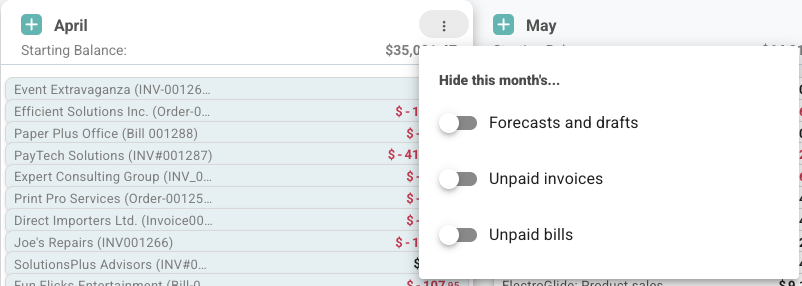
Open the current period controls from the menu in the current month header.
If there are overdue items, Budgee shows a small warning badge there.
What this menu does
The end-of-period menu has two separate jobs:
- hide certain items from the current period view
- clean up overdue items in bulk
These are different. The filters change what you see. The cleanup actions change the transactions themselves.
1. Hide things from the current period
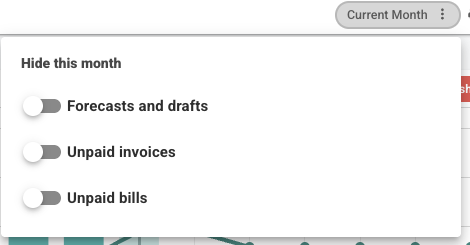
At the top of the menu, you can toggle:
- Forecasts and drafts
- Unpaid invoices
- Unpaid bills
These switches only affect the current period view.
They do not archive, delete, or delay anything. They simply hide those items from view for that period.
When one of these filters is active, Budgee shows indicator dots on the control so you can tell something is being filtered out.
What the filters are for
These filters are helpful when you want to simplify the current period without making permanent changes.
For example, you might hide:
- forecasts and drafts to focus only on actual activity
- unpaid invoices to reduce noise while reviewing cash movements
- unpaid bills to simplify an operational view
2. Clean up overdue items
Below the filters, Budgee groups overdue items into cleanup buckets.
Each row shows a count, and each bucket has an action you can apply to the whole group.
You can:
- select a row to preview the transactions in that group
- choose the action on the right to process the whole group
The cleanup sections are separated because old forecasts and old actual invoices or bills mean different things.
Why clear old forecasts and drafts
Forecasts and drafts are planning items. If they sit in the past, they can make the current month look cluttered or misleading.
Clear old forecast leftovers when the income, cost, or draft is no longer expected and should not keep affecting the active forecast.
Actual invoices and bills are different. They may still be real receivables or payables, so Budgee lets you delay or archive them instead of treating them like forecast leftovers.
Overdue forecast and draft groups
| Group | What it means | Action |
|---|---|---|
| Old forecasts | Forecasts dated before the first day of the current month | Delete |
| Recently overdue forecasts | Forecasts earlier than today but still in the current month | Delete |
| Old drafts | Drafts dated before the first day of the current month | Archive |
| Recently overdue drafts | Drafts earlier than today but still in the current month | Archive |
Important detail about forecasts
People often think of this as “archiving overdue forecasts”, but that is not what happens.
- Forecasts are deleted
- Drafts are archived
That difference matters.
Deleting a forecast removes it from the active result. Archiving a draft keeps it in history but out of the active working view.
Overdue invoice and bill groups
| Group | What it means | Available actions |
|---|---|---|
| Old invoices | Unpaid incoming actuals before the first day of the current month | Delay or Archive |
| Recently overdue invoices | Unpaid incoming actuals earlier than today in the current month | Delay or Archive |
| Old bills | Unpaid outgoing actuals before the first day of the current month | Delay or Archive |
| Recently overdue bills | Unpaid outgoing actuals earlier than today in the current month | Delay or Archive |
What Delay does
For overdue invoices and bills, Delay updates the Expected Date so the item moves out of the overdue view.
In the quick current-period menu, Budgee pushes the expected date to the suggested follow-up date, currently one month from today.
This is useful when the transaction is still expected, just not in the current period.
The original due date is not being shifted forward month by month in a chained way. Budgee is changing the expected cash timing for the selected overdue items.
What is included in these cleanup groups
The cleanup groups only include transactions that are:
- not deleted
- not archived
- not paid
- dated before today
From there, Budgee sorts them into the relevant buckets such as forecast, draft, invoice, or bill.
That means these groups are focused on still-active overdue items, not everything historical on the board.
If hidden bank account settings remove transactions from everyday views, those hidden transactions may also be left out of the current-period cleanup surface.
When to use each action
| Action | Best used when |
|---|---|
| Delete | You want to remove stale forecasts that should no longer remain in the forecast result |
| Archive | You want to keep something in history but remove it from the active working set |
| Delay | An unpaid invoice or bill is still expected, just not now |
A practical guide
- use Delete for overdue forecasts you do not want Budgee keeping around
- use Archive for drafts you may still want to refer back to later
- use Delay when an unpaid invoice or bill still matters, but should be pushed out of the current pressure window
- use Archive on invoices or bills when they should no longer be part of the active view at all
Things to know
| Situation | What happens |
|---|---|
| Filter toggle turned on | Items are hidden from the current period view only |
| Overdue forecast cleanup | Forecasts are deleted, not archived |
| Overdue draft cleanup | Drafts are archived |
| Overdue invoice or bill delayed | Expected Date is set to one month from today |
| Cleanup row selected | You can preview the transactions in that group |
| Warning badge shown | There are overdue items available for cleanup |
A simple mental model
If you want the shortest explanation, use this:
- the switches are view filters
- the count rows are cleanup queues
- forecasts are deleted
- drafts, invoices, and bills can be archived
- invoices and bills can also be delayed