
Searchable pickers and hidden items
Find categories, accounts, contacts, and targets quickly while keeping archived or hidden items out of normal workflows.
This guide covers:
- searching long selector lists
- archived categories in pickers
- hidden bank accounts in pickers
- why existing historical references still appear
Where to find searchable pickers
You will see searchable pickers throughout Budgee when choosing items such as:
- categories
- bank accounts
- contacts
- labels
- allocations or tracking categories
- forecast and scenario targets
These selectors appear in card dialogs, filters, imports, batch tools, scenarios, setup dialogs, and forecast workflows.
Search a picker
- Open the selector.
- Click into the search field if the selector does not focus it automatically.
- Type part of the item name.
- Choose the matching item from the filtered list.
Search is useful when an organisation has many categories, contacts, bank accounts, or targets and scrolling would be slow.
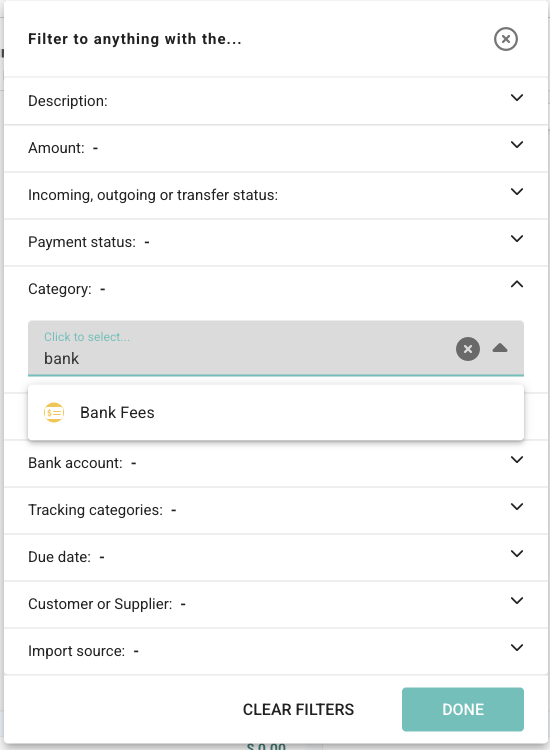
Controls you may see
| Control or message | What it means |
|---|---|
| Search | Filters the list as you type. |
| Clear | Clears the current search text. |
| No matches found | No available item matches the current search. |
| Edit categories or Bank accounts | Opens the management dialog when you need to add, edit, archive, or hide items. |
Archived categories in pickers
Archived categories are hidden from normal category lists so old categories do not clutter everyday workflows.
They can still appear when they are already selected on an existing transaction, forecast, scenario, import record, or setting.
This means Budgee can keep historical records understandable without encouraging new work to use retired categories.
How to read this behaviour
| Situation | What you will usually see |
|---|---|
| Creating a new item | Archived categories are usually hidden from the normal list. |
| Editing an old item | The archived category may still appear because it is already selected. |
| Searching for an archived category | It may not appear unless the current record already uses it. |
Hidden bank accounts in pickers
Hidden bank accounts are removed from normal selectors and views so accounts such as loans, clearing accounts, or closed accounts do not distract from everyday planning.
If a historical record still references a hidden account, Budgee preserves that reference. In some places, the record may show Hidden account so you know there is still an existing account link even though the account is hidden from normal selection.
Hidden does not mean deleted. Hidden items are kept out of everyday lists while preserving past records safely.
Good practices
- Search before creating a new item, especially on large boards.
- Archive old categories when they should not be used for new planning.
- Hide bank accounts when they should stay in history but disappear from everyday totals or selectors.
- Do not delete categories or accounts just to reduce picker clutter if old records still need them.
- If a hidden or archived item appears on an old record, treat it as context rather than a normal new-selection option.