
Bank account settings
Manage bank account types, search, ordering, credit limits, and visibility rules.
Use bank account settings when you need to:
- hide an account from day-to-day planning
- exclude a loan or clearing account from totals
- keep historical account references without cluttering selectors
- set a credit limit
- classify special account types more accurately
Where to find bank accounts
Open Options in the board header, then choose Edit bank accounts.
You may also reach bank account selectors from cards, batch tools, imports, filters, and setup dialogs.
Use the bank account list
The bank account dialog shows the accounts available to the board.
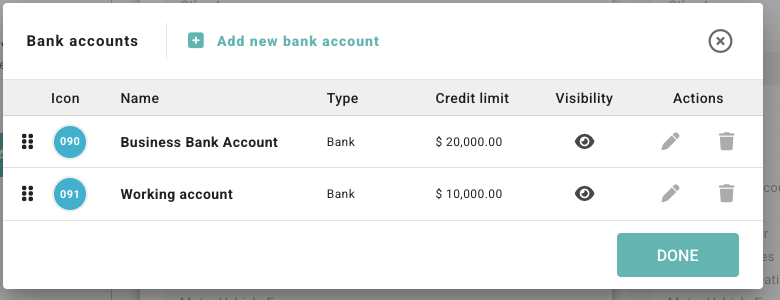
Controls you may see include:
| Control | What it does |
|---|---|
| Add new bank account | Creates a new account in Budgee. |
| Search bank accounts | Filters long account lists by name, description, icon text, type, or credit limit. |
| Drag handle | Reorders visible accounts. Reordering is disabled while a search filter is active. |
| Visibility icon | Shows whether the account is visible, fully hidden, or partly hidden. |
| Edit | Opens account details and visibility options. |
| Delete | Deletes the account and removes it from everywhere. Use this carefully. |
Edit a bank account
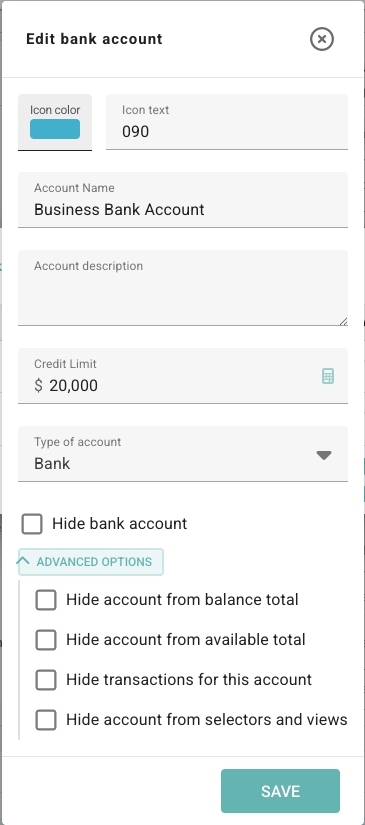
Click the edit button beside an account to change its setup.
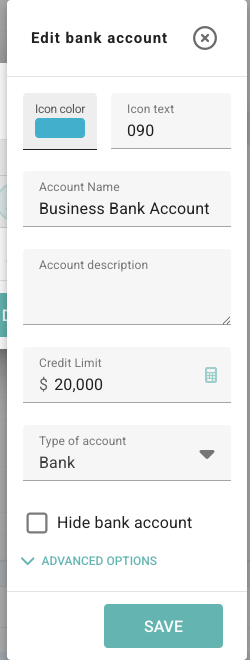
Fields can include:
- Icon color: sets the account badge colour.
- Icon text: sets the short account label shown in small spaces.
- Account Name: the account name used throughout Budgee.
- Account description: notes for your team about what the account is for.
- Credit Limit: the available credit limit, usually for credit card or overdraft-style accounts.
- Type of account: the account classification.
- Hide bank account: a quick switch for hiding the account from all visibility areas.
- Advanced options: opens individual visibility settings.
Choose the account type
Use Type of account to classify the account so Budgee can treat it more appropriately in totals and views.
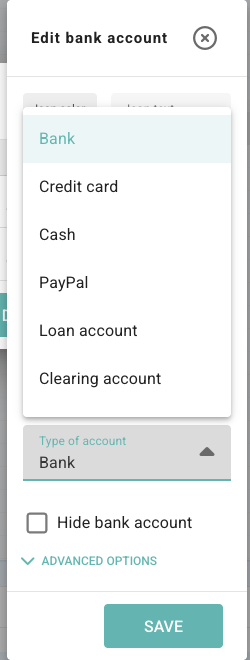
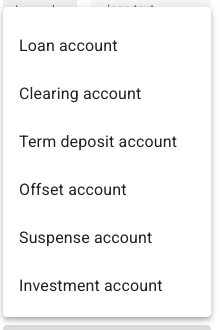
| Type | Common use |
|---|---|
| Bank | Everyday operating bank accounts. |
| Credit card | Credit card accounts and card liabilities. |
| Cash | Cash on hand or petty cash. |
| PayPal | PayPal balances or similar payment accounts. |
| Loan account | Loan accounts that may not be available operating cash. |
| Clearing account | Temporary clearing accounts used in accounting workflows. |
| Term deposit account | Funds held in a term deposit. |
| Offset account | Offset accounts linked to lending arrangements. |
| Suspense account | Suspense or holding accounts that need review. |
| Investment account | Investment or non-operating accounts. |
Some types, such as loan, clearing, and term deposit accounts, may default to being hidden from balance and available totals because they are often not everyday operating funds.
Use visibility controls
The main Hide bank account checkbox turns all visibility hide options on or off together.
Use Advanced options when only some parts of Budgee should hide the account.
| Advanced option | What it affects |
|---|---|
| Hide account from balance total | Excludes the account from balance totals. |
| Hide account from available total | Excludes the account from available funds totals. |
| Hide transactions for this account | Hides transactions linked to the account from everyday transaction views. |
| Hide account from selectors and views | Removes the account from normal selectors and view options. |
Visibility icons
- Visible: no hide options are enabled.
- Some hide options are enabled: the account is partly hidden.
- Hidden: all hide options are enabled.
How hidden accounts behave
Hidden accounts are kept out of normal selectors and views so day-to-day planning stays cleaner.
Budgee still preserves existing references so older transactions, forecasts, and settings do not lose context. Where needed, an existing reference may appear as Hidden account.
Use hide options when the account should remain in history but should not affect everyday planning views. Use delete only when the account should be removed from the board entirely.